Wsparcie produktu dla
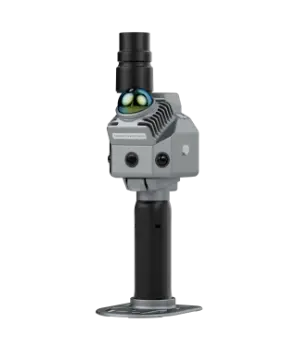
Skaner LiDAR FJD Trion P2
Pobierz
Instrukcja
Samouczki
Pobieranie oprogramowania sprzętowego
'/%3E%3Cdefs%3E%3ClinearGradient id='paint0_linear_546_121' x1='3' y1='-5.5' x2='21.498' y2='65.95' gradientUnits='userSpaceOnUse'%3E%3Cstop stop-color='%2347B2FF'/%3E%3Cstop offset='.454' stop-color='%231A77CE'/%3E%3Cstop offset='.647' stop-color='%230A68C5'/%3E%3Cstop offset='.825' stop-color='%230363C2'/%3E%3Cstop offset='1' stop-color='%230060C0'/%3E%3C/linearGradient%3E%3C/defs%3E%3C/svg%3E)
Oprogramowanie układowe V1.2.0
20260622
154.00MB
.zip
Informacje o wydaniu
Nowe funkcje
- Dodano widok z pierwszej osoby, aby pomóc użytkownikom oglądać mapowanie w czasie rzeczywistym z perspektywy skanera.
- Dodano przechwytywanie z wbudowanej kamery i kamery na podczerwień, aby powiązać zdjęcia z trajektoriami skanowania.
- Dodano ulepszanie skanowania, aby poprawić stabilność skanowania i gładkość podłoża w rzadkich scenach.
- Dodano tryb krajobrazowy, aby zapewnić lepszy podgląd na miejscu podczas skanowania.
- Dodano tryb długiego czasu do długotrwałych skanów i projektów na dużych obszarach.
- Dodano tryb USB do bezpośredniego przesyłania plików na komputer i debugowania urządzenia.
- Dodano ustawienia przechwytywania zewnętrznej kamery, aby ręcznie dostosować czas otwarcia migawki i ISO dla nagrywania poklatkowego Insta360 X3/X5.
- Dodano wykrywanie prędkości w czasie rzeczywistym oraz alerty ostrzegające użytkowników, gdy urządzenie porusza się zbyt szybko lub wibruje.
- Dodano przesyłanie dzienników oprogramowania układowego, aby umożliwić zdalne rozwiązywanie problemów.
- Dodano obsługę języka portugalskiego.
Ulepszenia
- Zoptymalizowano nazewnictwo trybu Wi‑Fi i ustawienia uruchamiania, aby opcje połączenia były łatwiejsze do zrozumienia.
- Zoptymalizowano wyświetlanie i obsługę punktów kontrolnych, aby użytkownicy mogli przeglądać, zarządzać i lokalizować punkty kontrolne podczas skanowania.
- Dodano obsługę usuwania adresów IP serwera CORS.
- Zaktualizowano funkcję Marker, dzięki czemu nie wymaga już połączenia z Insta360 i łatwiej odróżnić ją od przechwytywania obrazu kamerą.
- Naprawiono problem, przez który aplikacja Scan nie mogła prawidłowo zakończyć mapowania.
Kompatybilność
- Mapowanie i kolorowanie chmury punktów wymagają wersji Model PC V207.001 lub nowszej, Model iPad V1.10 albo Model Android Pad V1.3 lub nowszej.
- Przetwarzanie danych z kamery podczerwieni jest obsługiwane w wersji Model PC V207.001 lub nowszej; Pad nie jest obsługiwany.
Instrukcja obsługi
'/%3E%3Cdefs%3E%3ClinearGradient id='paint0_linear_737_612' x1='32' y1='-.5' x2='25.35' y2='55.327' gradientUnits='userSpaceOnUse'%3E%3Cstop stop-color='%2347B2FF'/%3E%3Cstop offset='.435' stop-color='%231A77CE'/%3E%3Cstop offset='.647' stop-color='%230A68C5'/%3E%3Cstop offset='.825' stop-color='%230363C2'/%3E%3Cstop offset='1' stop-color='%230060C0'/%3E%3C/linearGradient%3E%3C/defs%3E%3C/svg%3E)
Broszury produktowe
'/%3E%3Cdefs%3E%3ClinearGradient id='paint0_linear_737_616' x1='32' y1='1' x2='26.209' y2='54.202' gradientUnits='userSpaceOnUse'%3E%3Cstop stop-color='%2347B2FF'/%3E%3Cstop offset='.454' stop-color='%231A77CE'/%3E%3Cstop offset='.647' stop-color='%230A68C5'/%3E%3Cstop offset='.825' stop-color='%230363C2'/%3E%3Cstop offset='1' stop-color='%230060C0'/%3E%3C/linearGradient%3E%3C/defs%3E%3C/svg%3E)
'/%3E%3Cdefs%3E%3ClinearGradient id='paint0_linear_737_616' x1='32' y1='1' x2='26.209' y2='54.202' gradientUnits='userSpaceOnUse'%3E%3Cstop stop-color='%2347B2FF'/%3E%3Cstop offset='.454' stop-color='%231A77CE'/%3E%3Cstop offset='.647' stop-color='%230A68C5'/%3E%3Cstop offset='.825' stop-color='%230363C2'/%3E%3Cstop offset='1' stop-color='%230060C0'/%3E%3C/linearGradient%3E%3C/defs%3E%3C/svg%3E)
'/%3E%3Cdefs%3E%3ClinearGradient id='paint0_linear_737_616' x1='32' y1='1' x2='26.209' y2='54.202' gradientUnits='userSpaceOnUse'%3E%3Cstop stop-color='%2347B2FF'/%3E%3Cstop offset='.454' stop-color='%231A77CE'/%3E%3Cstop offset='.647' stop-color='%230A68C5'/%3E%3Cstop offset='.825' stop-color='%230363C2'/%3E%3Cstop offset='1' stop-color='%230060C0'/%3E%3C/linearGradient%3E%3C/defs%3E%3C/svg%3E)

Czytaj więcej
Skaner LiDAR FJD Trion P2
Rozpakowanie & szybki start
Mocowanie robota-psa FJD Trion S1
Dzięki zaawansowanemu algorytmowi SLAM model S1 tworzy obraz rzeczywistości podczas skanowania, dzięki czemu nie umknie Ci żaden szczegół.



Mocowanie robota-psa FJD Trion S1
Dzięki zaawansowanemu algorytmowi SLAM model S1 tworzy obraz rzeczywistości podczas skanowania, dzięki czemu nie umknie Ci żaden szczegół.
Pobieranie oprogramowania sprzętowego
Oprogramowanie sprzętowe V1.1.4
20260331
149.95MB
.zip
Informacje o wydaniu
Nowe funkcje
- Dodano obsługę kamery na podczerwień z wskaźnikami stron, kalibracją, podglądem na żywo, widokiem pełnoekranowym i notatkami do zdjęć.
- Dodano obsługę nowej wbudowanej kamery z wyraźniejszym obrazem i lepszą wydajnością.
- Włączono zbieranie punktów kontrolnych przez dwukrotne naciśnięcie przycisku zasilania skanera podczas skanowania.
Ulepszenia
- Ulepszono interakcję z chmurą punktów na urządzeniach mobilnych w zakresie przeglądania, pomiarów i ustawień po skanowaniu.
- Dodano wskaźniki Insta360 oraz obsługę automatycznego lub niestandardowego nazywania oznaczonych punktów.
- Zoptymalizowano funkcje KML i map, aby wyświetlać ślady RTK na żywo lub bieżącą lokalizację GPS.
Instrukcja obsługi
Broszury produktowe
Czytaj więcej
Skaner LiDAR FJD Trion P2
Rozpakowanie & szybki start
Mocowanie robota-psa FJD Trion S1
Dzięki zaawansowanemu algorytmowi SLAM model S1 tworzy obraz rzeczywistości podczas skanowania, dzięki czemu nie umknie Ci żaden szczegół.
Mocowanie robota-psa FJD Trion S1
Dzięki zaawansowanemu algorytmowi SLAM model S1 tworzy obraz rzeczywistości podczas skanowania, dzięki czemu nie umknie Ci żaden szczegół.