Real Job Sites: One Design File Is Often Not Enough
On real construction sites, design files are rarely single or static.
As projects grow in scale and construction becomes more refined, multiple design versions are often involved within the same work area. For example, different zones may require different elevations or slope specifications. In large-area site work, construction tasks are also frequently divided into multiple stages, such as rough leveling, cut-and-fill operations, slope finishing, or compaction.
This means that operators working on the same site often need to switch between several design files while ensuring that elevations remain consistent across different construction stages.However, in traditional workflows, grading or dozing operations are typically based on a single design file.
When the work area or construction phase changes, operators often need to re-import design files or even recreate the job file. This not only adds extra steps on site, but also increases the risk of selecting the wrong file or using inconsistent elevation references during frequent switching—ultimately affecting efficiency and operational continuity.
In complex projects, this approach can no longer meet real-world construction demands.

Feature Upgrade: Multiple Design Files in a Single Grading Operation
To address this practical challenge, the latest version of the GC100 (H36 PRO) Motor Grader Control System and the DC100 (H39 PRO) Dozer Control System introduces multi-design support for grading operations.
Within a single job, the system can load multiple design files simultaneously, such as base leveling plans, slope control designs, or cut-and-fill layouts. Operators can quickly switch between the required files based on the current work area or task—without needing to re-import files or create new jobs.
This upgrade allows machines to handle complex construction environments with multiple zones and tasks more efficiently, making the workflow smoother and more continuous.
Unified Elevation Reference: Ensuring Consistency Across Construction Phases
In large-scale projects, work is often carried out in multiple batches or stages—for example, initial rough grading followed by fine leveling or slope finishing.
To ensure elevation consistency between these stages, the system provides a clear and stable elevation reference mechanism. By default, the first loaded design file serves as the overall elevation reference for the entire job, ensuring a consistent starting point for construction.
During multi-stage or phased construction, this unified reference helps operators maintain elevation continuity between stages, reducing errors caused by manual calculations or frequent file switching.
When necessary, users can also manually adjust the elevation reference file according to actual site requirements, allowing the system to flexibly adapt to different zones or construction phases.
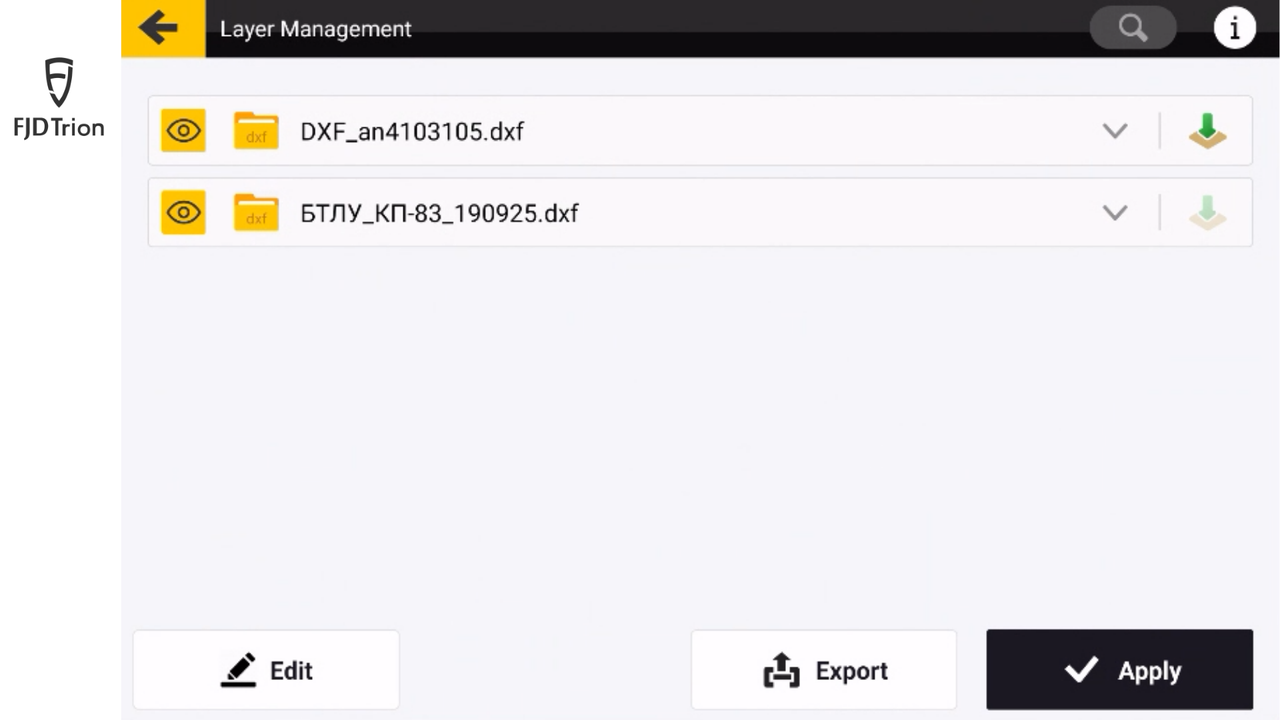
Layer Management: Clear Operation Even with Complex Designs
Once multiple design files are loaded into the system, they are managed centrally through the Layer Manager.
Each design file appears as an individual layer in the interface. Operators can quickly select the relevant design based on the current work area and control whether it is displayed or used for operation.
This layered management approach keeps complex design information well organized on the screen. It prevents visual clutter from overlapping designs and reduces the risk of mistakenly using the wrong file, making on-site operation clearer and more efficient.
Practical Value in Complex Construction Scenarios
In real-world projects, multi-design support can significantly improve operational efficiency.
In large-scale site leveling projects, different zones often have different design requirements. Operators can quickly switch between the corresponding designs within the same job, without repeatedly creating new job files.
In phased construction projects, design files for different stages can remain within the same job. Operators can switch between them according to construction progress while maintaining a unified elevation reference.
In multi-elevation or multi-slope construction scenarios, managing multiple designs in parallel also streamlines the workflow and reduces the time spent repeatedly importing files or switching datasets.
Smoother Operation, More Stable Construction
For operators, multi-design support reduces repetitive file imports and setup steps, making the workflow more continuous.
For project managers, unified design management and a stable elevation reference mechanism help standardize the use of design files and reduce construction errors.
Overall, machines can switch more efficiently between different tasks and better adapt to complex construction environments.
A System Upgrade Built for Real-World Conditions
Supporting multiple design files in a single grading operation is not simply an increase in system features—it represents an important step forward in how the GC100 (H36 PRO) and DC100 (H39 PRO) adapt to complex construction environments.
With unified multi-design management, a stable yet flexible elevation reference mechanism, and an operational logic consistent with excavator guidance systems, the equipment is better aligned with real job-site needs.
The goal of this upgrade is not just to add more features—but to ensure that complex designs can be used on site in a way that is:
Smooth, reliable, and confidence-inspiring.